

OPPO unveiled ColorOS 17 globally on October 13, 2026, bringing artificial intelligence deeper into the smartphone operating system. The Android 17-based software introduces AI tools that can organise personal files, edit photographs through written instructions, retrieve saved information and identify potential AI-powered scams.
The biggest addition is AI Mind Pilot with Agent Mode, which moves beyond answering questions to performing multi-step tasks on a user's behalf. OPPO has partnered with Manus to bring these capabilities into the operating system.
ColorOS 17 will debut with the upcoming OPPO Find X10 series, followed by a phased rollout to other eligible devices. The company has also published an official update schedule on its Indian website.
ColorOS 17 AI Features: Key Highlights
- AI Mind Pilot: Finds, organises and works with files and photographs through simple instructions.
- Agent Mode: Uses multi-step AI assistance powered by Manus and ChatGPT.
- AI Photo Agent: Edits images using written prompts, reference photographs and automatic suggestions.
- AI Mind Space: Saves documents, links and personal information in searchable collections.
- AI Mind Suggest: Displays useful travel information, reminders and recommendations proactively.
- OSee: Uses the camera to recognise objects, translate text and scan documents.
- AI Live Interpreter: Translates conversations using supported wireless earbuds.
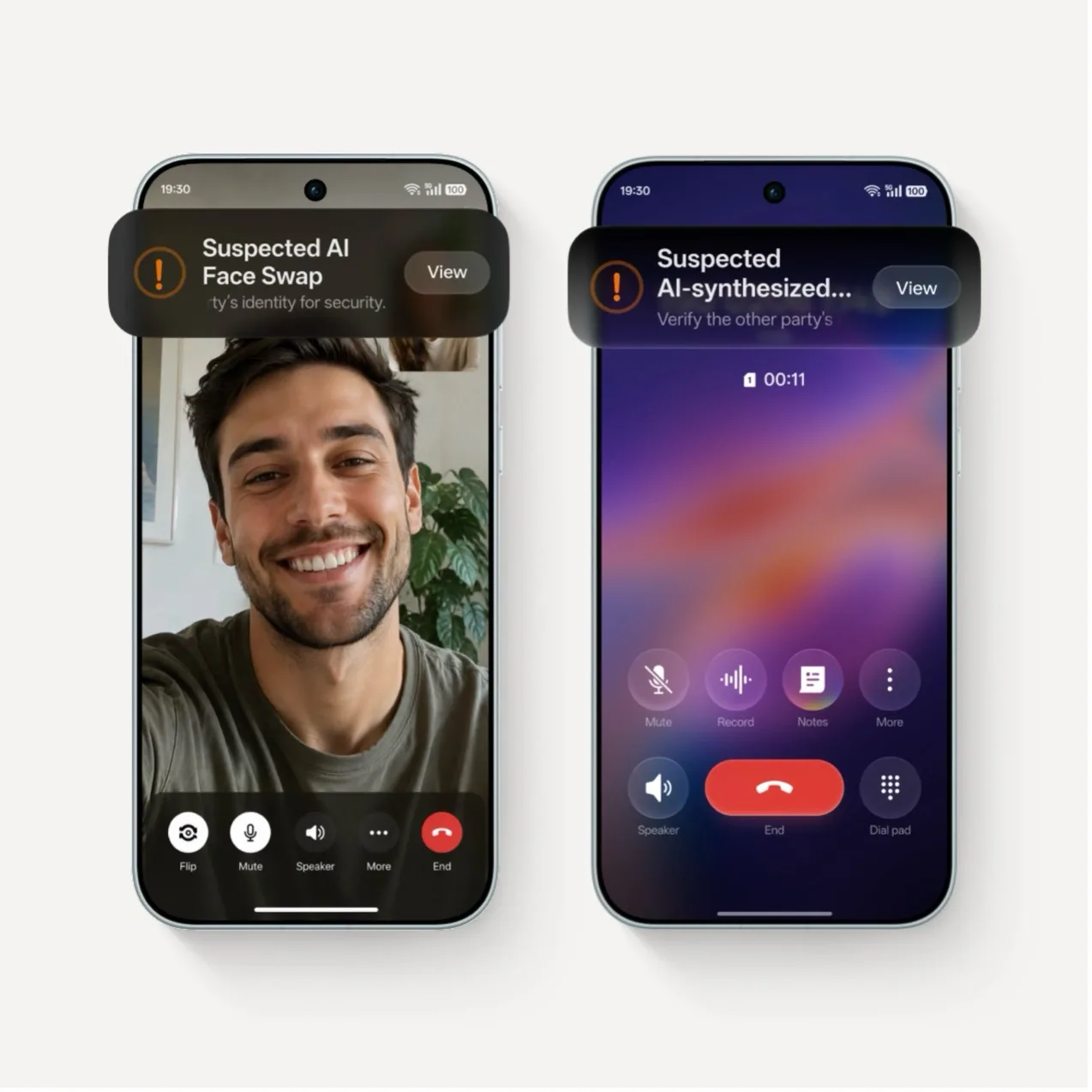
- AI Call Guard: Identifies potential synthetic voices, face swaps and fraud risks.
- Private Computing Cloud: Adds safeguards and greater transparency for cloud-based AI processing.
OPPO's ColorOS 17 Roll-Out Schedule
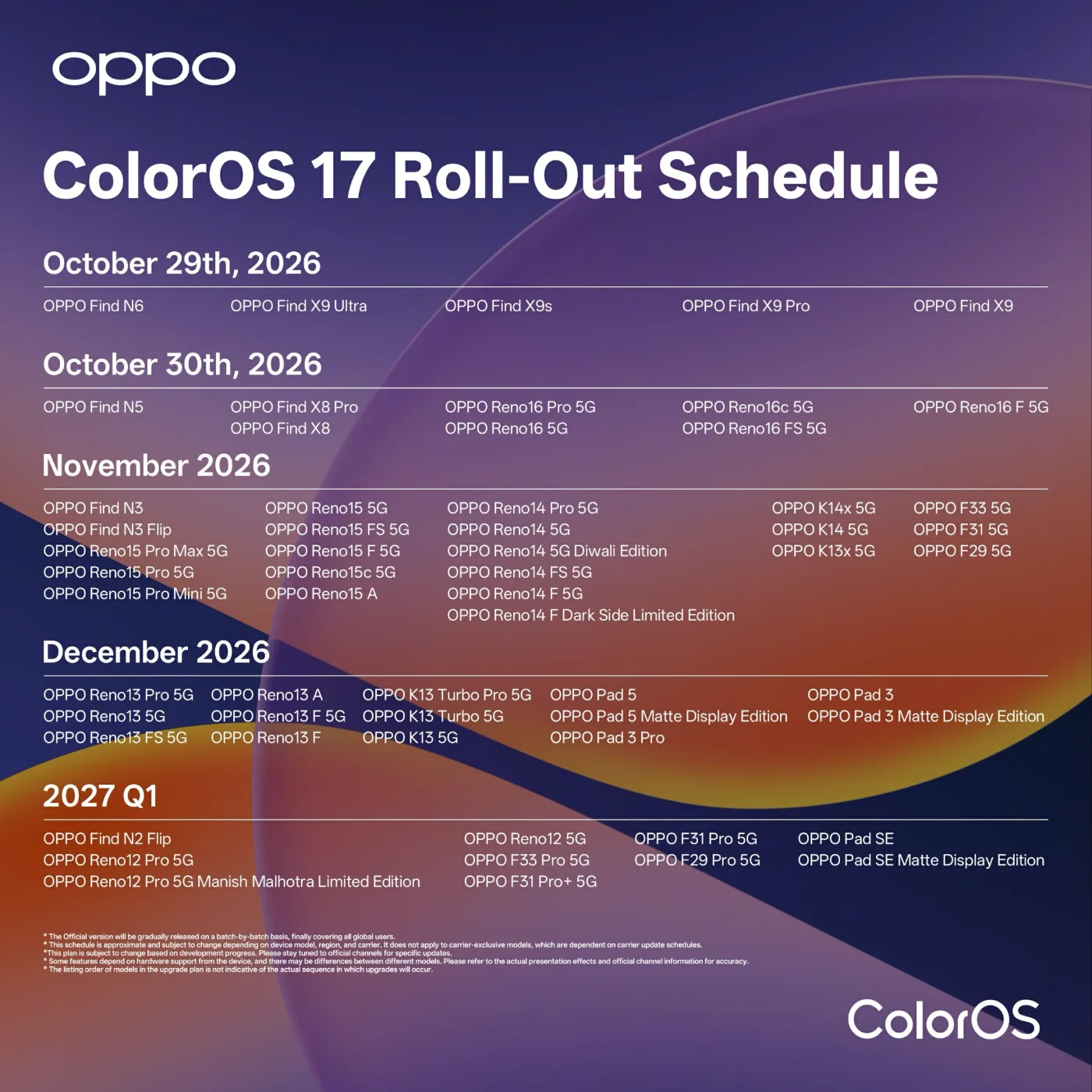 Source: Oppo
1. What Is AI Mind Pilot, and What Can It Actually Do?
AI Mind Pilot is the standout productivity feature of ColorOS 17. Instead of opening several apps and manually organising information, users can describe what they need.
For example, someone planning a holiday could ask the AI to organise their travel documents.
AI Mind Pilot is designed to:
- Find flight tickets, hotel confirmations and booking documents stored on the phone.
- Rename and categorise files according to their content.
- Combine relevant information into a travel itinerary.
- Organise holiday photographs into albums.
- Create presentations, webpages or other content using available information.
OPPO says Agent Mode will initially support both Manus and ChatGPT. Users will receive a complimentary usage allowance, although limits depend on the region. Existing subscribers can connect supported accounts.
Importantly, these capabilities require user permission, and the exact experience may depend on supported services and devices.
Also Read | OnePlus Restructuring: The Real Truth Behind the 2026 OPPO Takeover
2. How Does AI Photo Agent Work in ColorOS 17?
AI Photo Agent allows users to edit photographs by describing the desired result rather than manually changing numerous settings.
Its main capabilities include:
- Natural-language editing: Request changes to lighting, colours, composition or appearance using ordinary instructions.
- Style Match: Upload a reference photograph and apply a similar colour palette or visual mood to another image.
- Automatic suggestions: Let AI analyse a picture and recommend suitable improvements.
- ProXDR preservation: OPPO says its processing can retain the original image's ProXDR effect after AI editing.
For instance, a user could ask for a warmer sunset tone or provide a reference portrait to achieve a similar photographic style.
However, AI Photo Agent currently supports static photographs rather than video, and OPPO has confirmed monthly usage limits. Availability will expand gradually across markets.
3. What Is AI Mind Space? Can It Remember Documents and Links?
AI Mind Space works as a personal information library. ColorOS 17 expands its capabilities so users can store and retrieve information without searching separately through notes, screenshots and documents.
New improvements include:
- Saving long-form content through Long-doc Capture.
- Storing supported video links, including from YouTube and TikTok.
- Generating summaries of saved information.
- Automatically grouping related information into Smart Collections.
- Combining saved travel ideas with location information to help plan trips.
A useful example is saving restaurant recommendations, travel videos and destination ideas over several weeks. AI Mind Space can organise that information into a collection for later reference.
Some capture features are subject to regional restrictions, so users should verify local availability.
 Source: OPPO
4. Can ColorOS 17 Give Reminders Without Being Asked?
Yes. AI Mind Suggest is designed to display information proactively when the system considers it relevant.
Examples include:
- Upcoming flight information and travel reminders.
- Train journey cards and relevant updates.
- Travel disruption alerts.
- Personalised music recommendations when headphones are connected.
- Useful information surfaced on the home screen.
For Indian users, OPPO specifically mentions support for a MakeMyTrip Train Card, although availability of individual services varies by region.
The practical advantage is fewer manual checks across different apps. Whether the feature is useful will depend on the accuracy of its contextual suggestions and the services supported on a particular phone.
5. What Is OSee? How Does the Camera-Based AI Work?
OSee brings several visual AI tools into a single camera-based experience. Users can point their phone's camera at something and access contextual assistance, including:
- Identifying objects and everyday items.
- Translating printed text or restaurant menus.
- Scanning documents into clearer digital copies.
- Looking up information about objects and places.
- Accessing nutrition-related analysis.
For example, someone travelling abroad could point their camera at a menu and use translation without searching separately for a suitable tool.
OPPO's aim is to make the camera an entry point for practical AI services, rather than requiring users to switch between multiple applications.
6. Does ColorOS 17 Support Real-Time Language Translation?
ColorOS 17 introduces an upgraded AI Live Interpreter to support conversations between speakers using different languages. Its capabilities include:
- Delivering translated speech through compatible earbuds.
- Displaying the conversation on the smartphone.
- Using speaker recognition to support more natural communication.
- Reducing the need to repeatedly hand the phone between speakers.
OPPO confirms compatibility with Enco X4 and OnePlus Buds Pro 4 earbuds, when paired with select phones running ColorOS 17.
The feature is not guaranteed across every OPPO handset or every language.
7. Can ColorOS 17 Detect AI Voice Scams and Deepfakes?
This is one of the more relevant additions for Indian smartphone users. ColorOS 17 introduces AI Call Guard, which uses on-device detection to identify potential fraud risks involving synthetic voices and manipulated faces.
Key protections include:
- Detection of potentially AI-generated voices during calls.
- Identification of suspicious face-swapped video content.
- Alerts when the system identifies possible manipulation.
- Additional protection features designed to make smartphones safer for vulnerable users.
OPPO's Indian ColorOS 17 page also lists Synthetic Voice Recognition for phone calls and WhatsApp calls.
The company confirms that AI Call Guard is available in India, Indonesia and Thailand. However, detection is not a guarantee against fraud; users should independently verify suspicious financial requests, even when no warning appears.
8. Are ColorOS 17 AI Features Safe for Personal Data?
OPPO says ColorOS 17 combines on-device processing, cloud security and permission-based access.
- Local file processing: AI Mind Pilot can find, organise and rename local files without sending the originals to Manus.
- User approval: External uploads require explicit authorisation when necessary.
- Private Computing Cloud: OPPO says cloud AI processing uses protected environments designed to prevent third-party access.
- Post-quantum security: New safeguards aim to strengthen information transmitted between devices and cloud services.
- Transparency Report: Users can inspect and export records showing which AI services were used and when.
These are OPPO's stated safeguards, not an independent security audit. Users handling sensitive documents should still review permissions and external-processing requests carefully.
9. Which OPPO Phones Will Receive ColorOS 17 in India?
OPPO has published a phased update schedule extending from October 2026 into the first quarter of 2027.
| Rollout period | Major eligible devices |
| October 2026 | Find N6, Find N5, Find X9 series, Find X8 series, Reno16 series |
| November 2026 | Find N3 series, Reno15 series, Reno14 series, selected K14, K13x, F35, F33, F31 and F29 models |
| December 2026 | Reno13 series, K13 Turbo series, K13 5G, Pad 5 and Pad 3 series |
| Q1 2027 | Find N2 Flip, Reno12 series, selected F35, F33, F31 and F29 models, Pad SE series |
This is a summarised list, not the complete model-by-model schedule. Rollout timing can vary by market, device variant and carrier.
Readers should check the official OPPO India rollout schedule for their exact device model.
10. Is ColorOS 17 Faster Than ColorOS 16?
Beyond AI, OPPO has introduced the Living Flow Design, Luminous Rendering Engine and upgraded Laminar Flow Engine to improve animations, app responsiveness and multitasking.
According to OPPO's laboratory tests:
- Up to 55% improvement in app launch stability.
- Up to 50% faster initial Gallery thumbnail loading.
- More than 25% higher background app retention.
- Up to 30% reduction in rendering load in certain scenarios.
- Over 90% smoothness retention after simulated six-year usage tests.
These are manufacturer-reported figures, not independently verified performance measurements. Actual improvements will vary depending on hardware and usage. OPPO Global
11. Will OnePlus Phones Also Get ColorOS 17?
Eligible OnePlus users may also receive access to ColorOS 17 through the company's announced voluntary software transition.
However, the precise eligibility, regional rollout and rollback procedures should be checked against future official OnePlus communications.
For more details, read News4Bharat's earlier report: OxygenOS to ColorOS: What Changes for OnePlus Users?.
The Bottom Line: Is ColorOS 17 a Meaningful AI Upgrade?
ColorOS 17 represents a significant change in OPPO's software strategy. Instead of limiting AI to image editing, text generation and voice assistance, the company is integrating it into everyday tasks such as file management, travel planning, translation and fraud detection.
AI Mind Pilot's Agent Mode is the feature to watch. If it works reliably across personal documents, photographs and connected services, users could complete tasks that currently require several apps and manual steps.
For Indian users, AI Call Guard, travel assistance and improved translation tools may deliver more immediate benefits. The bigger questions are how consistently these features work, how much access they require to personal information and which capabilities reach individual devices.
ColorOS 17's promise is clear. Its success will depend on what users can reliably do with these AI tools after installation—not simply how many AI features OPPO advertises.